From a Casting Call to Search Conditions
How Castar reads a free-text casting call with a single LLM call, turns it into strict filters and soft preferences, and why it would rather show no one than the wrong actor.
A casting call is written for people. A typical one reads something like: Supporting male role, early 40s to early 50s. Fluent English required. 178 cm or taller. Swimming a plus. A warm but weathered face, short hair. Most calls on Castar are written in Korean; the examples in this post are English translations.
An actor profile is written for a database. On Castar it holds a small set of structured fields: gender, birth year, height, weight and skills picked from a fixed list. It also has photos.
Search sits between the two. This post describes how Castar turns the first into something it can run against the second, and the decisions we made along the way. The most important one is about what the system should do when the honest answer is “nobody.”
Every casting call, role and output in this post is made up for illustration.
Two kinds of conditions
Read a casting call closely and its conditions fall into two groups.
Symbolic conditions map onto a profile field. “Male” is a value of gender. “Early 40s to early 50s” is a range over age, which we can work out from birth year. “178 cm or taller” is a bound on height. “Fluent English” and “swimming” are entries in the skills list. For each of these, a profile either meets the condition or it doesn’t.
Semantic conditions have no field. “A warm but weathered face,” “sharp features” and “looks like he has worked outdoors all his life” describe appearance and impression, and the only place that information lives is the photos. How well an actor fits is a matter of degree, and partly of taste.
We handle the two separately on purpose, because they fail differently. A wrong symbolic match is plainly wrong: a 21-year-old for a role written as “50s.” A semantic match can always be argued about. If both are folded into one similarity score, one can make up for the other, and a strong appearance match can lift an actor who doesn’t meet the age requirement above one who does. Keeping them apart lets the symbolic side be exact and the semantic side be graded.
This post covers the symbolic side. Appearance goes through a separate image–text channel, which will get its own post.
One call, one small JSON
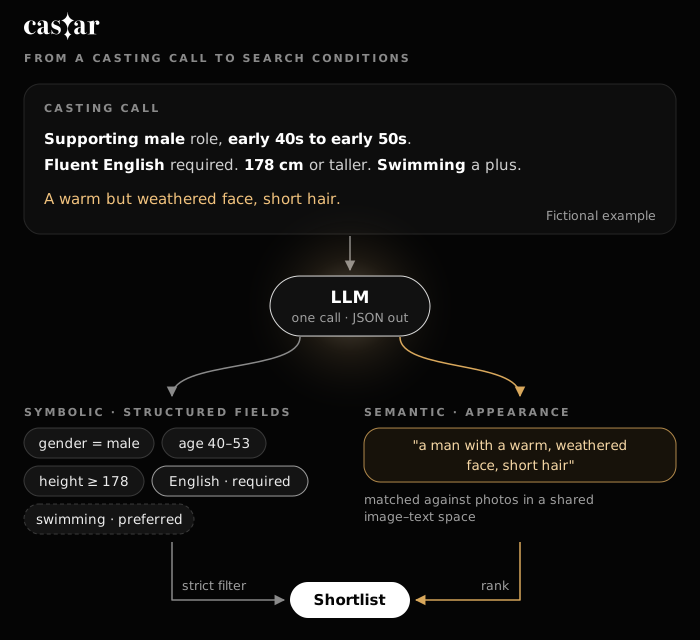
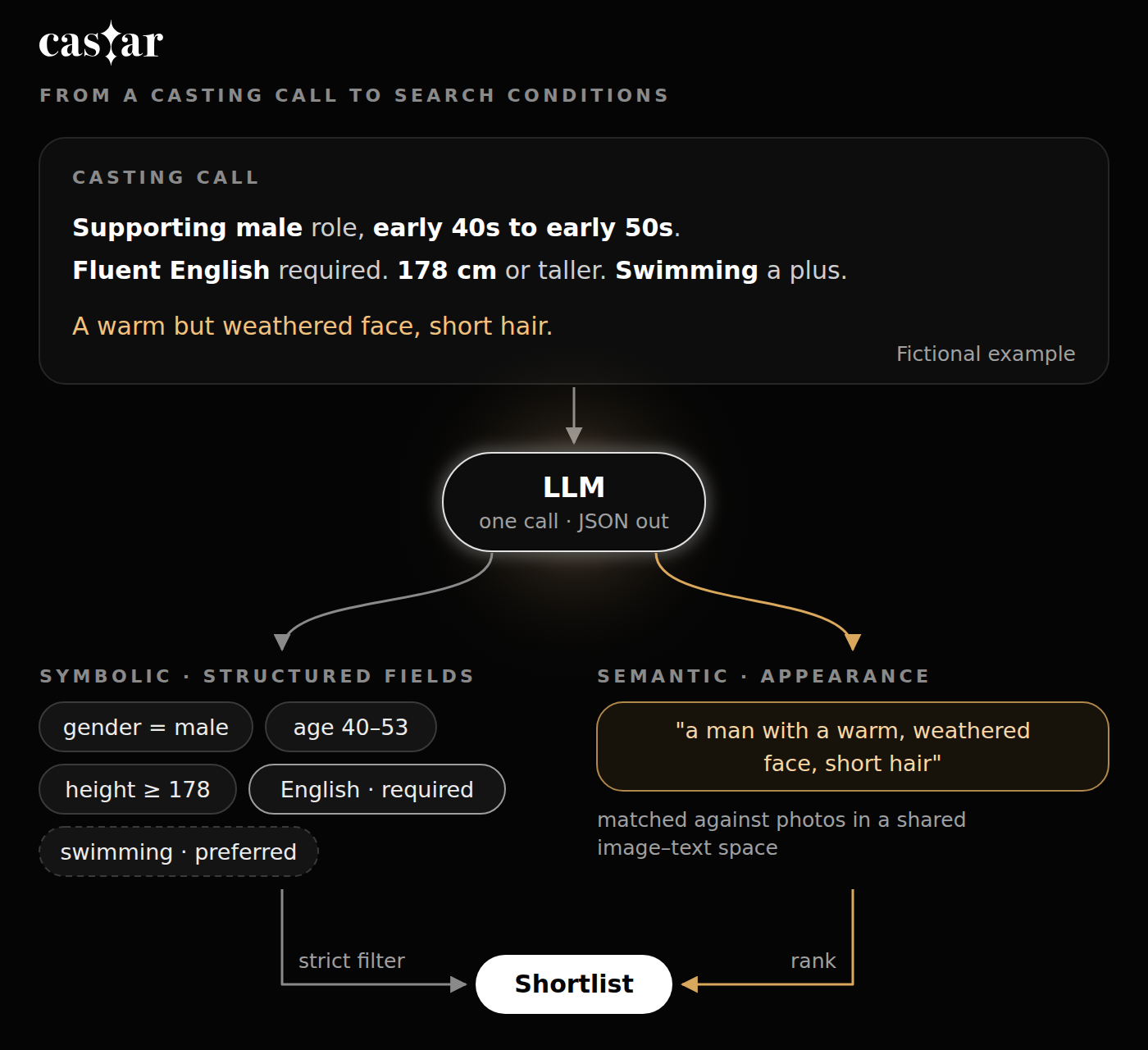
Each casting call goes to a language model once. Along with the text, the prompt carries the rules described below and the platform’s skill vocabulary, and asks for one compact JSON object. With field names simplified for this post, the object has these parts:
| Field | What goes in it |
|---|---|
gender |
"male", "female", or null if the call doesn’t say |
age |
a numeric range {min, max}, or null |
height_cm |
numeric bounds, only when the call gives a number |
skills.required |
labels from the platform’s skill vocabulary |
skills.preferred |
labels from the same vocabulary |
appearance |
a short description of look and impression, for the image channel |
Anything the call doesn’t state stays null or empty. The model is told to fill a field only when the text supports it. A missing filter excludes nobody, while a guessed one quietly excludes people.
We use a single call rather than a chain of them (one for age, one for skills, one for appearance, and so on). Latency and cost grow with the number of calls, and every extra call is another place for a timeout or a malformed response. The parts also depend on each other. Whether “swimming” is required or preferred depends on the sentence around it, and one pass sees the whole call at once. The cost is a longer prompt that has to be maintained as a single unit.
The rest of this section goes through the fields one at a time.
Gender
Gender is filled when the call states it, or when the role word itself carries it, as with “father” or “grandmother”. Otherwise it stays null. An occupation on its own, like “detective,” doesn’t count.
Age: decade phrases become numbers
Casting calls usually give age as a decade, split into thirds: early, mid and late. We map each third to a fixed span of final digits: early is X0–X3, mid is X4–X6 and late is X7–X9.
| Phrase | Range |
|---|---|
| 40s | 40–49 |
| early 40s | 40–43 |
| mid 40s | 44–46 |
| late 40s | 47–49 |
| early 40s to early 50s | 40–53 |
A span such as the last row takes the lower bound of its first phrase and the upper bound of its second.
{"min": 40, "max": 53}: from the start of the early forties to the end of the early fifties. Highlighted ages are inside the range.Not every call uses a decade phrase. Bare words such as “young man” or “middle-aged” are mapped to default ranges written into the prompt. The model doesn’t make up a range for each query. The defaults are one explicit, editable guess.
The output is always a pair of numbers, never a label. An earlier prototype of our search used two coarse age groups, “young” and “old,” and the line between them was never written down anywhere. A numeric range can be checked directly against a birth year, and when a range is wrong, you can see exactly how it’s wrong.
Height: only when there is a number
“178 cm or taller” becomes {"min": 178}. “Tall” becomes nothing. Turning a relative word into a cutoff would mean picking a number the producer never gave, and that number would silently remove everyone just below it.
Skills: only from our own vocabulary
Skills on a Castar profile come from a fixed vocabulary: languages, sports, instruments and so on. The model gets that list and may only answer with labels from it. Along the way it normalizes synonyms. “Can ride horses” and “horseback riding” both become the platform skill Horse riding. “Spanish-speaking” becomes Spanish, and “fluent English” becomes English.
The restriction matters because a filter is only useful if a profile can satisfy it. If the model wrote free-form skills, “horseback riding” would never match a profile that lists Horse riding, and a correct-looking filter would return nobody.
Required or preferred
Casting calls separate what a role needs from what would be nice to have, and the separation is usually marked in the wording. Phrases like “a plus,” “preferred,” “nice to have” or “bonus points for” mark a condition as optional. “Swimming a plus” puts swimming under preferred. Skills stated as plain requirements, like “Fluent English required,” go under required.
Appearance text
Whatever describes look and impression goes into a short appearance string, which is passed to the image–text channel. Nothing in it becomes a filter.
Strict means strict
Once the conditions are extracted, the required ones are applied as a filter: gender, the age range (compared with the age we compute from birth year), height bounds and required skills. An actor who fails any of them is out.
If nobody passes, the search stops and tells the producer there are no matching actors yet. It doesn’t loosen the age range or drop the English requirement and try again.
We did it the other way at first. When the filtered pool came back empty, the earlier prototype dropped the weakest condition and retried until something came back. That looks helpful, but it changes the question without telling anyone. A producer who wrote “50s” and sees a 21-year-old at the top of the list will either waste time on a candidate who was never going to fit, or will stop trusting the rest of the list. It’s worse because the result looks like a match. Nothing on the screen says “we ignored your age requirement.”
An empty result carries information. It tells the producer that the platform doesn’t have this person yet, and the producer can decide which condition to loosen, since they know which ones actually matter for the role. It also tells us where the actor pool is thin.
Preferred conditions never remove anyone. They only affect the order of the actors who passed the strict filter: someone who meets a preferred condition moves up, and someone who doesn’t stays in the list.
We also don’t show numbers next to results: no “92% match” and no impression score. A similarity value from a model isn’t the probability that someone is right for a role, but a number on screen invites people to read it that way and to treat 87 versus 84 as a real difference. Results are shown in order, without scores.
A worked example
Here is the fictional casting call from Figure 1 in full.
- Role
- Supporting male role, early 40s to early 50s.
- Required
- Fluent English required.
- Height
- 178 cm or taller.
- Preferred
- Swimming a plus.
- Look
- A warm but weathered face, short hair.
The single LLM call returns (field names and labels simplified):
{
  "filters": {
    "gender": "male",
    "age": { "min": 40, "max": 53 },
    "height_cm": { "min": 178, "max": null }
  },
  "skills": {
    "required": ["English"],
    "preferred": ["Swimming"]
  },
  "appearance": "a man with a warm, weathered face, short hair"
}
Line by line:
- “Male” becomes
"gender": "male". “Supporting” describes the size of the part, not the actor, so it doesn’t become a condition. - “Early 40s to early 50s” becomes 40–53, using the rule from Figure 2.
- “178 cm or taller” has a number, so it becomes a lower bound on height. There is no upper bound.
- “Fluent English required” is normalized to the platform skill English and, because the call says “required,” it’s a required skill.
- “Swimming a plus” is marked as a plus, so Swimming is preferred.
- “A warm but weathered face, short hair” becomes the appearance text. None of it becomes a filter.
The search then keeps only male actors aged 40 to 53, at least 178 cm tall, with English in their skills. If that set is empty, the producer sees “no matching actors yet.” If it isn’t, actors who swim move up, and the appearance channel orders the rest.
What this doesn’t solve yet
- Vague age words depend on defaults. “Young man” becomes whatever range the prompt says it is. Those defaults are explicit and easy to change, but they’re still our guess about what a producer means, and producers won’t all agree with it.
- The vocabulary has to be maintained. Every new skill and every new way of saying an old one (“horse riding,” “horseback riding,” “can ride a horse”) needs a home in the vocabulary. A skill that isn’t in the vocabulary can’t become a filter at all.
- Birth year is coarse. Age computed from a birth year can be off by one near a birthday, so an actor at the edge of a range can land on either side of it.
- Strictness cuts both ways. Because required conditions exclude people, an extraction mistake (a misread age, or a preferred skill marked as required) also excludes people without saying so. Strict filtering makes the quality of this one LLM call matter more, not less.
- Evaluation is ongoing. We’re still measuring how reliably the extraction handles real-world phrasing, and we’ll write about it when we have results we trust.
Next
This post covered the symbolic half of a casting call: conditions that map onto fields and can be checked exactly. The other half, “a warm but weathered face,” “sharp features” and the rest of the appearance vocabulary, can’t be checked that way. It goes through a separate image–text channel, and that will be the subject of our next post.